
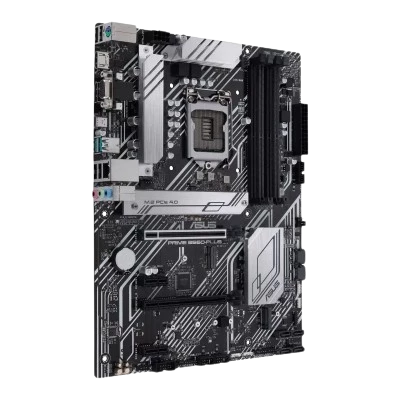
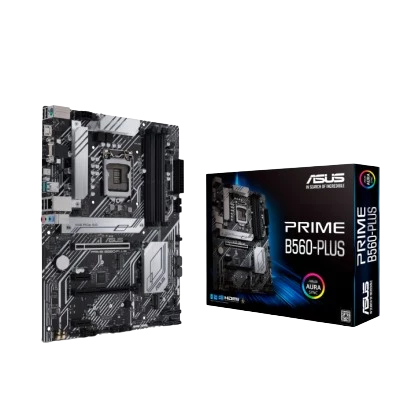
Asus PRIME B560-PLUS

Availability: OutOfStock
₹13272.00

About this item : Intel® B560 (LGA 1200) ATX motherboard with PCIe® 4.0, two M.2 slots, 8 power stages, Intel® 1 Gb Ethernet, DisplayPort, HDMI, D-Sub, USB 3.2 Gen 1 Type-C®, rear USB 3.2 Gen 2, Thunderbolt™ 4 header support, Aura Sync, and Aura Sync RGB lighting

Product Code: TWMB26
Current Jc Qty: 0
Model : Asus PRIME B560-PLUS
Brand : Asus
Category : Mother Board
Ram Support : DDR4
Product Factor : ATX
Socket : LGA 1200
Chipset : B560
Wifi: N
Ram Slot: 4
Total Nvme Slot: 2

Available Options

+


Asus PRIME B560-PLUS

  • Intel® LGA 1200 socket: Ready for 11th Gen Intel® Core™ processors
  • Comprehensive cooling: VRM heatsink, flexible M.2 heatsink, PCH heatsink, hybrid fan headers and Fan Xpert 2+
  • ASUS OptiMem: Careful routing of traces and vias to preserve signal integrity for improved memory stability
  • Ultrafast connectivity: PCIe 4.0, Intel® 1 Gb Ethernet, rear USB 3.2 Gen 1 Type-C® and Thunderbolt™ 4 header support
  • 5X Protection III: Multiple hardware safeguards for all-round protection.
CPU Intel® Socket LGA1200 for 11th Gen Intel® Core™ Processors & 10th Gen Intel® Core™, Pentium® Gold and Celeron® Processors Supports Intel® 14 nm CPU Supports Intel ® Turbo Boost Technology 2.0 and Intel® Turbo Boost Max Technology 3.0** *Refer to www.asus.com for CPU support list. **Intel® Turbo Boost Max Technology 3.0 support depends on the CPU types.
Chipset B560
Memory 4600(OC)/4400(OC)/4266(OC)/4000(OC)/3733(OC)/3600(OC)/3466(OC) /3333(OC)/3200(OC)/2933/2800/2666/2400/2133 MHz Non-ECC, Un-buffered memory* Dual channel memory architecture Supports Intel® Extreme Memory Profile (XMP) ASUS OptiMem * 11th Gen Intel® processors support 2933/2800/2666/2400/2133 natively. * 10th Gen Intel® Core™ i7/i9 processors support 2933/2800/2666/2400/2133 MHz natively, others will run at the maximum transfer rate of DDR4 2666MHz. Refer to www.asus.com for the Memory QVL (Qualified Vendors Lists), and memory frequency support depends on the CPU types.
Multi-GPU Support *Graphics specifications may vary between CPU types. ** For Intel® 11th & 10th processors, support DisplayPort 1.4 with max. resolutionof 4096 x 2304 @60Hz. Please refer to www.intel.com for any update. ***Only Intel® 11th processors support HDMI™ 2.0 with max. resolution of 4K@60Hz, others will only support HDMI™ 1.4 with max. resolution of 4K@30Hz. Please refer to www.intel.com for any updates.
Expansion Slots Intel® 11th &10th Gen Processors 1 x PCIe 4.0/3.0 x16 slot* – Intel® 11th processors support PCIe 4.0 x16 – Intel®10th processors support PCIe 3.0 x16 Intel® B560 Chipset 1 x PCIe 3.0 x16 slot (supports x4 mode)* 2 x PCIe 3.0 x1 slots *Enable RST PCIe Storage Remapping for PCH attached PCIe slots to activateIntel® Optane Memory.
Storage Intel® 11th Gen Processors – M.2_1 slot (Key M) type 2242/2260/2280/22110 (supports PCIE 4.0 x 4 ) – Only Intel® 11th processors support PCIe 4.0 x4 mode, this slot will be disabled for other CPUs Intel® B560 Chipset – M.2_2 slot (Key M) type 2242/2260/2280/22110 (supports PCIE 3.0 x 4 & SATA mode modes) – 6 x SATA 6Gb/s ports When a device in SATA mode is installed on the M.2_2 socket, SATA6G_2 port cannot be used.
Audio Realtek ALC897 7.1-Channel High Definition Audio CODEC* Jack-detection, Multi-streaming, Front Panel Jack-retasking – Supports up to 24-Bit/192kHz playback Audio Features – Audio Shielding – Premium Japanese audio capacitors – Dedicated audio PCB layers *A chassis with an HD audio module in the front panel is requiredto support 7.1-channel audio output.
USB Ports 2 x USB 3.2 Gen 2 ports (2 x Type-A) 1 x USB 3.2 Gen 1 port (1 x USB Type-C®) 4 x USB 2.0 ports 1 x USB 3.2 Gen 1 header supports additional 2 USB 3.2 Gen 1 ports 2 x USB 2.0 headers support additional 4 USB 2.0 ports
Software Features ASUS Exclusive Software: Armoury Crate – AURA Creator -AURA Sync AI Suite 3 -Performance And Power Saving Utility Turbo EVO Digi+ VRM EPU Fan Xpert 2+ – EZ update ASUS CPU-Z DAEMON Tools Norton Anti-virus software(Free Trial for 60 days) WinRAR UEFI BIOS ASUS EZ DIY – ASUS CrashFree BIOS 3 – ASUS EZ Flash 3 – ASUS UEFI BIOS EZ Mode
Special Features ASUS 5X PROTECTION III – ASUS DIGI+VRM – ASUS LANGuard – ASUS Overvoltage Protection – ASUS SafeSlot Core+ – ASUS Stainless-Steel Back I/O ASUS Q-Design: – ASUS Q-DIMM – ASUS Q-Slot ASUS Thermal Solution – Flexible M.2 heatsink – VRM heatsink design ASUS EZ DIY – Box Headers AURA SYNC – AURA RGB headers – Addressable Gen 2 RGB headers
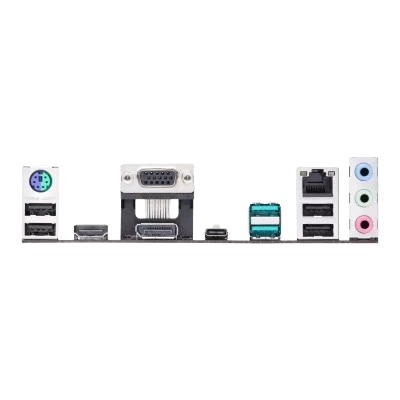
Back I/O Ports 1 x DP port 1 x HDMI port 1 x D-Sub port 3 x Audio jacks 1 x PS/2 Keyboard/Mouse combo port 1 x Intel® I219-V 1Gb Ethernet port 4 x USB 2.0 ports (4 x Type-A) 2 x USB 3.2 Gen 2 ports (2 x Type-A) 1x USB 3.2 Gen 1 port (1 x USB Type-C®)
Internal I/O Ports Fan and cooling-related 1 x 4-pin CPU Fan header 3 x 4-pin Chassis Fan headers Power related 1 x 24-pin Main Power connector 1 x 8-pin +12V Power connector Storage related 2 x M.2 slots (Key M) 6 x SATA 6Gb/s ports USB 1 x USB 3.2 Gen 1 header supports additional 2 USB 3.2 Gen 1 ports 2 x USB 2.0 headers support additional 4 USB 2.0 ports Miscellaneous 2 x AURA Addressable Gen 2 headers 2 x AURA RGB headers 1 x Clear CMOS jumper 1 x COM Port header 1 x Front Panel Audio header (AAFP) 1 x S/PDIF out header 1 x 20-3pin System Panel header with Chassis intrude function 1 x SPI TPM header (14-1 pin) 1 x M.2 slot (key E) 1 x Thunderbolt 4 header
Accessories Cables 2 x SATA 6Gb/s cables Miscellaneous 1 x M.2 Rubber Package 1 x IO Shield 1 x M.2 SSD screw package 1 x M.2 Key E screw package Installation Media 1 x Supporting DVD Documentation 1 x User’s manual
BIOS 128 Mb Flash ROM, UEFI AMI BIOS
Manageability WOL by PME, PXE
Form Factor M-ATX
Warranty 3 Years
Mausam Ali January 21, 2024

The only motherboard in the market fits all my requirements HARDWARE USED: ASUS Prime B560-Plus motherboard i5-11500 CPU paired with Enermax ETS-T40fit (200W TDP) CPU Cooler WD SN 850 500GB gen 4 x4 M.2 NVMe SSD Patriot Memory Viper Steel (2x8 GB) DDR4-3600MHz XMP memory My PC build with this motherboard was not as smooth as the other reviewers claimed. Hopefully my experience with it can help other PC builders resolving some issues. As a share holder of Newegg stock, this can help avoiding unnecessary return of the motherboard to Newegg. During initial Win 10 installation, the LAN driver was not available . It will be good to have a USB Wi-Fi dongle connected before installing Win 10. When activating and installing Win 10, it will check if Wi-Fi dongle is present. If so, Win 10 will ask for Wi-Fi password. If dont have internet yet, just click I dont have internet, this will allow minimum setup. Once activated and rebooted, insert ASUSs driver disc to load drivers. However, one driver is still missing (I did not notice it until later on, after encountering some problems, and that led me to install Win 10 again and things acted a little bit different from first installation, same Wi-Fi dongle password worked during first Win 10 installation were not accepted during second time. I still do not understand why). Visited Intel site to download Driver and Support Assistant and run it. Rebooted and the driver was still missing from Device Manager. At this point I believed I got to return the motherboard to Newegg. Did not give up yet, later on reset BIOS to Optimized Defaults and then saved. This time no more missing driver, problem resolved. Out of so many motherboards in the market, this is the only one that fits all my requirements (budget, form factor, multi PCI x 16 slots, three video ports, no GPU needed, multi M.2 slots, Thunderbolt 4 header...etc). Definitely will recommend people to use this good value motherboard for 11th generation CPU and PCIe 4.0 x4 M.2 NVMe SSD (and 10th generation as well). I believe performance for my current new PC is way, way overkill for general daily tasks, but no complain for doing things faster. The two cons are not enough for me to take out an egg as they can be compensated or fixed. Here, I can answer my own questions posted April 16 ,2021 that all 3 video ports working right with the UHD 750 graphics with this motherboard.

Write a review

Note: HTML is not translated!
Rating Bad           Good
Brand Asus
Info ASUS: The Best PC for Gaming and Productivity